
Create your own zone cleaning lists without overwhelm
When it comes down to it, the idea of zone cleaning is based on two things:
- You imagine dividing your home down into a number of “zones,” each one containing a few rooms or areas.
- Then, you apply a simple schedule that cycles through one zone at a time. That helps you lock in and complete just one or two small extra task in one area.
Home Routines app has a flexible Zone cleaning section you can use to plan and manage this. We’re not locked to anyone’s system. It works with your looping schedule, or day of the week. You can even customise an alternative “Flylady” style week-of-the month schedule.
How to build up your zone cleaning lists
We have put some basic tasks into the zone room lists, but you know what’s in your place. Some cleaning apps have you identifying all your tasks and frequency schedule, as soon as you start using the app. That sounds stressful! I have a different idea.
Build up your lists, in and out of schedule
As soon as I start a small task, I will notice other things that need doing.
This is the best time to add the task to my list! It doesn’t matter if the task is cleaning, decluttering or tidying. Instead of getting flustered by all the other tasks, I can record it and move on.
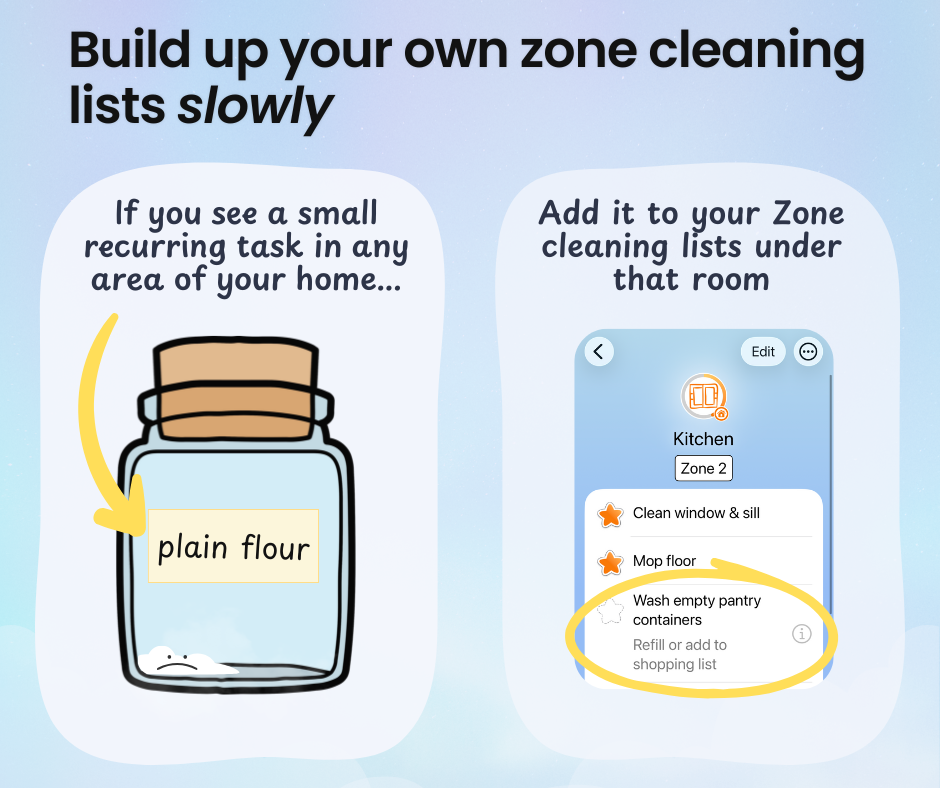
I just add the task to the relevant area in my Zones list. Even if I have time to tackle that task right away, it’s still worth taking that extra minute.
If I complete it right then, I can still mark it as done and receive my gold star.
Whether I complete it or not, the task will be there to remind me when I’m next in that scheduled zone.
I can even go back and add a completed date. I’m absolutely going to make sure I add dates to all the windows I cleaned before Christmas Day!
Who’s going to tell me what to do?
I understand how handy it is to be given a mission of the day. I am not immune to a side quest!
That’s why we added the One Thing mode to the Home Routines app. Tap the star icon at the bottom of any list, and you’ll see a card with just one relevant task.
If you struggle with activation due to mental health stuff or neurodivergence, this can really help with decision-making fatigue.
Make it random!
For a bit of extra novelty-based dopamine, with Home Routines Premium you can shuffle your tasks and draw a random task card from your current zone. There’s your daily mission 🙂
PS: Don’t get tangled up thinking that you’re not “allowed” to work outside the current “zone.” It’s not like you’d spill your giant iced coffee on the carpet and then say “Oops! You need to wait till we’re back in Zone 3!”
That’s why you can mark tasks as complete in any zone, at any time.